
Printable resources are available as PDFs throughout the platform. You can open and download a PDF anywhere you see a PDF option.
The easiest way to find printable materials is through the Teacher Guide.
Find PDFs in the Teacher Guide
Open the Teacher Guide for your course to access printable resources such as:
- Student Activities
- Unit Assessments
- Student Support Guide
- Teacher Tools
When a PDF is available, select the PDF option to open the file.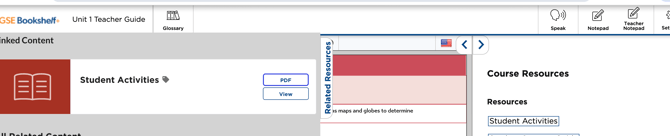
Download a PDF
Once the PDF is open, use the Download icon in the PDF viewer to save a copy to your device.
You can follow these same steps anywhere else in the platform that you see a PDF option. You do not have to access the file through the Teacher Guide.
Print a PDF- Open the PDF you want to print.
- Select the Print icon in the PDF viewer.
- Choose your printer and review your print settings.
- Select the pages and number of copies you need.
- Select Print.
Tip: The Teacher Guide is the easiest place to find many of your printable course resources in one place, but any PDF you encounter can be opened, downloaded, and printed.