
MyGSEBookshelf+ includes built-in tools that help students, teachers, and families interact with text in different ways. These tools are available throughout the digital book, including text within the Teacher Guide.
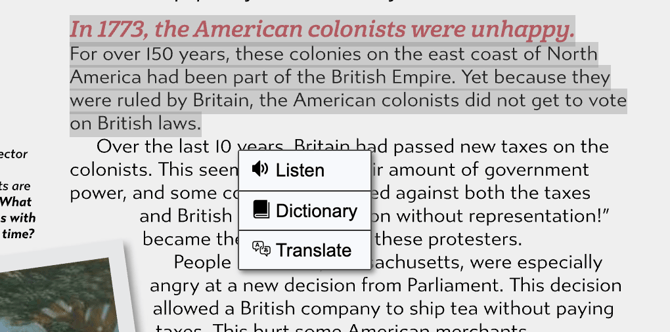
To access them, simply highlight a word, sentence, or passage. A menu will appear with three options:
- Listen
- Dictionary
- Translate
Listen
Select Listen to have the highlighted text read aloud.
This can support students who benefit from hearing text while they read, including students working on fluency, pronunciation, or comprehension. Because you can highlight a specific word, sentence, or passage, students can choose exactly what they want to hear rather than listening to an entire page.
Dictionary
Select Dictionary to view a Google Dictionary definition for a highlighted word.
However, when a term has been intentionally identified as important course vocabulary, we recommend using the Gibbs Smith Glossary instead.
The Glossary is available at the top of the page and contains definitions created specifically for Gibbs Smith content. These definitions are written at an appropriate Lexile level and are designed to help students understand the term in the context of what they are learning.

Which definition should I use?
For general words that a student encounters while reading, the Dictionary tool can be a convenient reference.
For highlighted course vocabulary and key academic terms, use the Gibbs Smith Glossary whenever possible. These definitions have been intentionally developed for the instructional content and student reading level, while the Dictionary option provides a general Google Dictionary definition.
Translate
Select Translate to translate the highlighted text using Google Translate.
Because the translation happens on demand, you can translate anything from a single word to a larger passage without needing a separately translated version of the book.
This means schools can provide language access to a much broader range of students without having to commission a complete professional translation of every title into every language, a process that can otherwise be costly and time-consuming.
Supporting Multilingual Learners
Translation can help multilingual learners access the same instructional content as their classmates while they continue developing English proficiency.
Students might use Translate to:
- Check their understanding of a sentence or passage.
- Compare English text with a translation in a language they know.
- Clarify unfamiliar academic language.
- Build confidence before discussing or responding to a passage in English.
- Access content more independently rather than waiting for translated materials.
Translation can be especially useful as a scaffold: students can use their home language to support comprehension while continuing to interact with the original English content.
Translation Can Support Families, Too
The Translate tool is not limited to student use.
Because translation is available throughout the digital content, including instructional materials such as the Teacher Guide, it can also help families who are more comfortable reading a language other than English better understand what their student is learning.
Giving parents and caregivers greater access to classroom content can help create a stronger connection between school and home. Rather than receiving only a brief description of a unit or relying on their student to explain it, families can explore the material themselves and better understand the topics, vocabulary, and ideas being taught.
That access can support:
- Trust, by making curriculum more transparent and accessible.
- Communication, by giving families more context for conversations with teachers and students.
- Participation, by helping parents and caregivers ask informed questions about what their student is learning.
- Connection, by creating opportunities for students to discuss classroom topics with family members in the language they use at home.
- Community, by reducing language as a barrier to engaging with the school experience.
Translation does not replace the important role of professional interpreters and translators when precise communication is required, but it can make everyday instructional content significantly more accessible to families.
A Note About Google Translate Accuracy
Translations in Gibbs Smith digital content are generated by Google Translate, so they should be treated as machine translations rather than professionally reviewed translations.
Machine translation technology has improved considerably, but accuracy can vary depending on the language, complexity of the text, vocabulary, and context.
For example, a published study evaluating machine translation found that Google Translate achieved high sentence-level accuracy for some languages, including 96% for English-to-Spanish and 90% for English-to-Chinese in the specific materials studied, while performance was lower for Russian. The researchers also cautioned that longer sets of translated material were more likely to contain at least one error. (PubMed Central (PMC))
For that reason, Translate works especially well as an access and comprehension tool, but important or high-stakes communication should still be reviewed by someone proficient in the language or handled through appropriate professional translation or interpretation services.
Learn more about research on machine-translation accuracy:
Evaluation of the accuracy and safety of machine translation
Highlight text → choose the tool you need:
Listen — Hear the highlighted text read aloud.
Dictionary — View a general Google Dictionary definition.
Translate — Translate the highlighted text using Google Translate.
For key vocabulary identified in the course, remember to use the Gibbs Smith Glossary at the top of the page for the intentionally written, appropriately Lexiled definition.